How to share logs and stack traces with AI without leaking secrets
In short
- Ordinary logs hide tokens, connection strings, emails and internal hostnames.
- Trim to the relevant window, scrub, read once, then paste.
- Consistent placeholders keep the log readable for the AI.
In this guide
Pasting a log into an AI assistant is one of the best uses of these tools. It is also the most common way people leak credentials without noticing. A stack trace itself is harmless. The two hundred lines around it are not.
What hides in an ordinary log
| Where | What you will find |
|---|---|
| Request logging | Authorization: Bearer eyJ... headers, API keys in query strings, session cookies |
| Startup and config output | Database connection strings with passwords, SMTP credentials, cloud access keys, the contents of .env |
| Application errors | User emails, names and IDs in the message that failed, sometimes full records serialised as JSON |
| Infrastructure | Internal hostnames, private IP ranges, file paths that include a username, container and cluster names |
| Browser and mobile logs | Device identifiers, location data, tokens stored in local storage |
Each of these is easy to miss when you are focused on the exception at the bottom.
12:01:04 login ok alice@example.com
12:01:09 retry from 203.0.113.9
12:01:15 token ghp_x8QkL2…
12:01:22 sms to +31 6 1234 5678
12:01:04 login ok [EMAIL_1]
12:01:09 retry from [IP_1]
12:01:15 token [TOKEN_1]
12:01:22 sms to [PHONE_1]
Four steps, about a minute
1. Trim to the window that matters
Take the lines from the first sign of trouble to the error, plus a little context. A model reasons better over 60 relevant lines than over 2,000 noisy ones, and every line you cut is a line that cannot leak.
2. Replace secrets and personal data with placeholders
Do not delete them: delete and the model loses the structure. Replace them with consistent placeholders so [TOKEN_1] on line 12 is recognisably the same thing as [TOKEN_1] on line 40. That is what lets the model say "the token on line 40 is expired" instead of guessing.
2026-11-09 10:14:03 GET /api/orders?user=jan.jansen@example.nl
2026-11-09 10:14:03 Authorization: Bearer eyJhbGciOiJIUzI1NiIsInR5cCI6IkpXVCJ9.eyJzdWIiOiI0MiJ9.x2Hs...
2026-11-09 10:14:04 ERROR pg: password authentication failed for user "app" (host db-prod-eu1.internal)

becomes

2026-11-09 10:14:03 GET /api/orders?user=[EMAIL_1]
2026-11-09 10:14:03 Authorization: Bearer [SECRET_1]
2026-11-09 10:14:04 ERROR pg: password authentication failed for user "app" (host [HOST_1])
The debugging value is intact. The exposure is gone.
3. Watch the sneaky ones
- Credentials inside URLs:
postgres://app:S3cret@host/db. The password is between the colon and the at sign. - Base64 blobs. A long run of letters, digits,
+and/ending in=is often an encoded secret or a serialised object with personal data inside. - JWTs. Three dot separated base64 segments starting with
eyJ. The middle part decodes to a readable JSON payload, usually with a user ID or email. - Cloud metadata: AWS access keys start with
AKIA, GitHub tokens withghp_orgithub_pat_, Stripe keys withsk_live_, Slack withxox.
4. Read it once more as the recipient
Before pasting, scan the text as if you were a stranger who wants to get into your systems. If anything in it helps that stranger, it has to go.
If something slipped through
Treat the secret as compromised and rotate it now, not after the debugging session. Deleting the chat afterwards is good hygiene but does not undo the exposure. We keep a step by step list in what to do after pasting an API key into an AI chat.
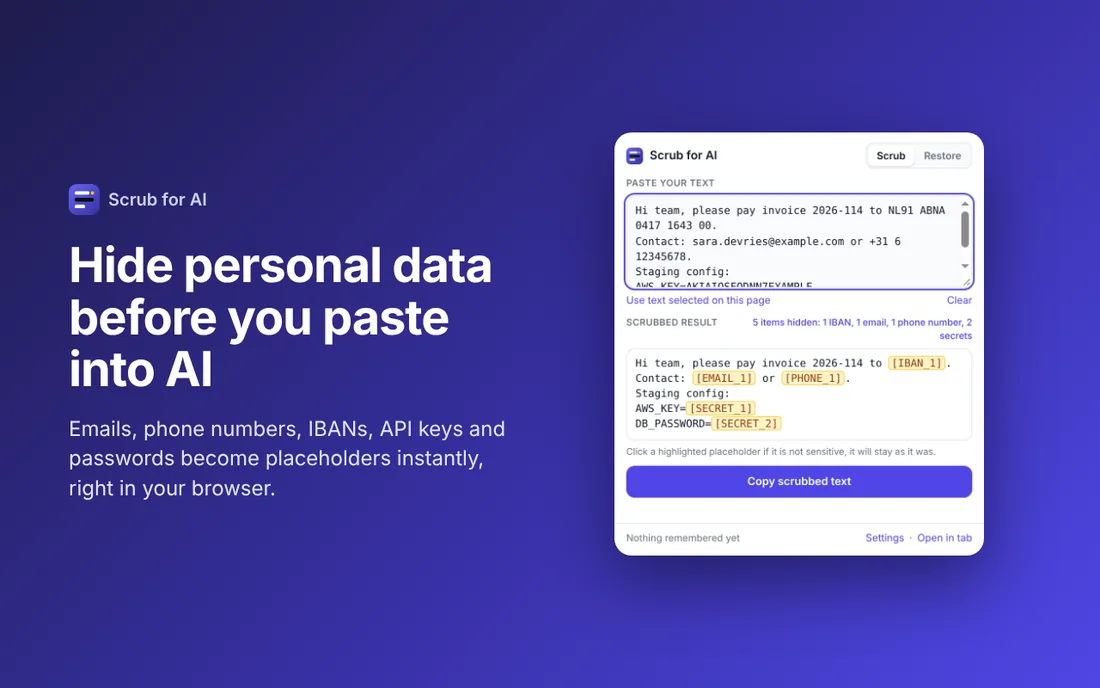
Make it automatic
All of the above can be done by hand. It is tedious, and tedious steps get skipped at 11 pm when production is down. Scrub for AI does steps 2 and 3 in one keystroke: select the log, press the shortcut, paste the scrubbed version. When the assistant replies with a fix that mentions [HOST_1], a second shortcut puts the real hostname back.
Scrub before you paste
Scrub for AI replaces emails, phone numbers, IBANs, API keys and passwords with placeholders in one click, and puts them back when the answer returns. Free, runs offline, no account.
More: all guides · Scrub for AI · Copy for AI · Tables for AI